This article was prepared with AI assistance based on an analysis of the current Lumina Studio source code, existing Wiki content, and relevant workflows. It has been checked against the current version, but omissions or details that become outdated may remain as the software evolves. If you find an error or have a clearer explanation, example, or suggestion, please leave a comment on this page or propose an edit on GitHub.
Cloisonné (in development)
Cloisonné extracts a wireframe from matched-colour boundaries, creates a separate Wire object, and forces a Single-sided base. The feature is still marked as under construction and may be incomplete on complex artwork.
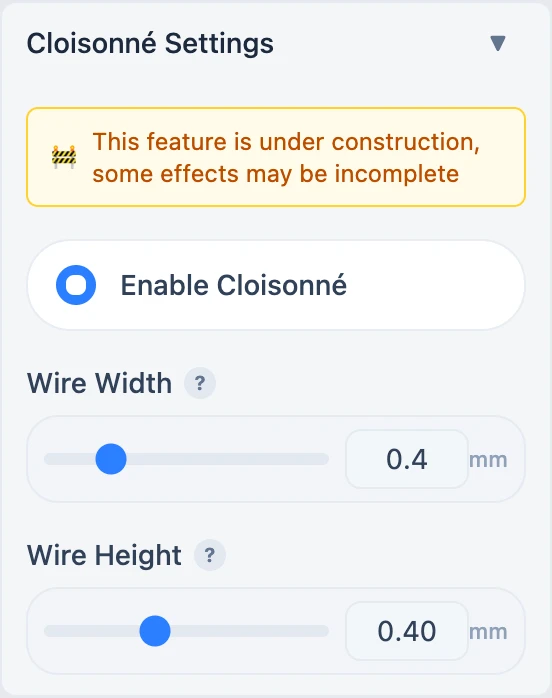
Parameters
- Wire Width: 0.2–1.2 mm in 0.1 mm steps; controls horizontal wire thickness.
- Wire Height: 0.04–1.0 mm in 0.04 mm steps; controls how far Wire rises above the colour regions.
A narrow wire can fall below reliable nozzle line width. A wide wire can cover adjacent colours. Extra height increases texture but also raises clearance and surface-collision risks.
Current limits
- Relief and Cloisonné are mutually exclusive.
- The option is disabled in Vector modeling mode.
- Wire uses a fixed gold preview colour for identification; actual print colour depends on slicer material assignment.
- Every change requires a newly generated 3MF.
Because the interface explicitly labels this feature as in development, validate the 3D preview, object list, sliced layers, and a small test piece before using it for a final print.
Submit feedback
Your feedback is sent privately to the Wiki maintainers and is not displayed publicly on this page.