This article was prepared with AI assistance based on an analysis of the current Lumina Studio source code, existing Wiki content, and relevant workflows. It has been checked against the current version, but omissions or details that become outdated may remain as the software evolves. If you find an error or have a clearer explanation, example, or suggestion, please leave a comment on this page or propose an edit on GitHub.
Keychain Loop parameters
The loop is real geometry in the final 3MF, not a preview marker. Its thickness follows the model's total layer stack and its material comes from the slot assigned during generation.
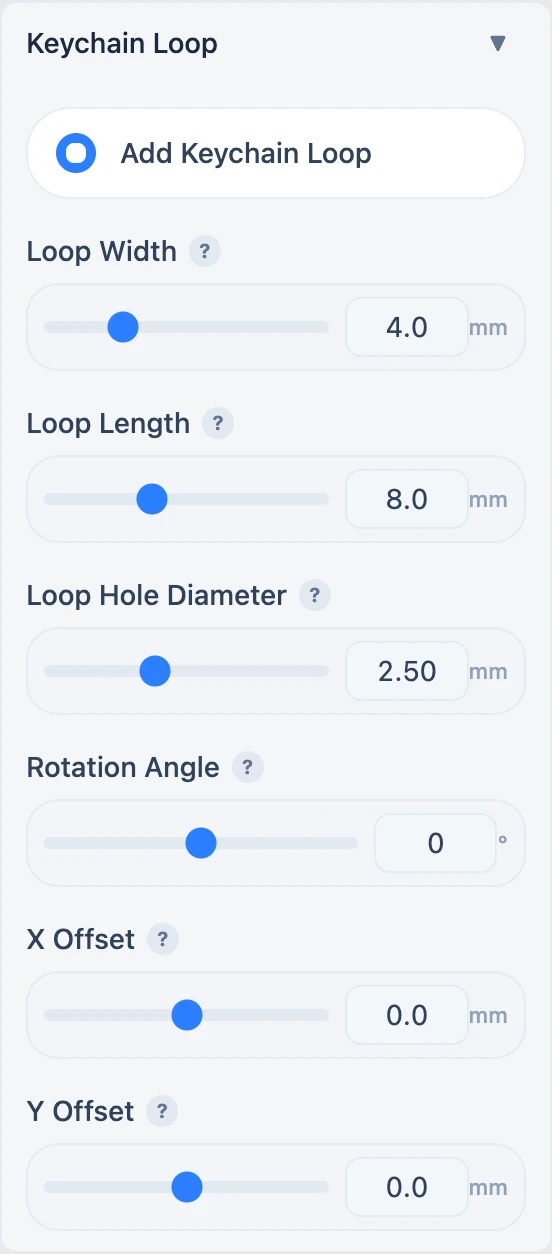
Size
| Parameter | Range | Effect |
|---|---|---|
| Loop Width | 2–10 mm, 0.5 mm steps | Outer horizontal size |
| Loop Length | 4–15 mm, 0.5 mm steps | Distance from the attachment end outward |
| Loop Hole Diameter | 1–5 mm, 0.25 mm steps | Opening for a ring or lanyard |
The hole must leave enough printable wall around it. A value being accepted by the interface does not guarantee that every nozzle, material, or connector can print it reliably.
Position
- Rotation Angle: -180° to 180°; 0° points upward and positive values rotate clockwise.
- X Offset: -200 to 200 mm; positive moves right.
- Y Offset: -200 to 200 mm; positive moves up.
Offsets are relative to the model centre. Excessive offsets detach the loop from the body.
Puzzle or Fridge Magnet mode disables the loop. Regenerate the 3MF after every change, then verify that the loop is joined to the body and that the opening survives slicing.
Submit feedback
Your feedback is sent privately to the Wiki maintainers and is not displayed publicly on this page.