This article was prepared with AI assistance based on an analysis of the current Lumina Studio source code, existing Wiki content, and relevant workflows. It has been checked against the current version, but omissions or details that become outdated may remain as the software evolves. If you find an error or have a clearer explanation, example, or suggestion, please leave a comment on this page or propose an edit on GitHub.
Relief
Relief turns a flat colour model into 2.5D geometry. Colour recipes still control the surface colour; the Relief settings control the height assigned to each region.
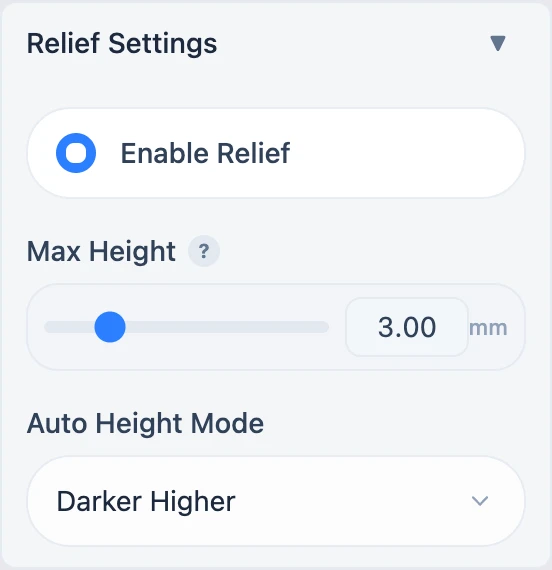
What enabling Relief changes
- Structure Mode is forced to Single-sided.
- Cloisonné is disabled because the two geometry paths are mutually exclusive.
- If a palette exists but has no height data, Lumina creates an initial map using the selected luminance direction.
- The old preview and 3MF become stale and must be regenerated.
- Relief is currently unavailable in Vector mode.
Maximum height
The range is 0.08–15 mm in 0.04 mm steps. Changing the maximum rescales existing colour heights proportionally instead of flattening every colour to the same value.
With Material Archive, the minimum also has to contain the current optical stack. Lumina derives a safe lower bound from the material layer count and backing thickness.
Auto Height Mode
| Mode | Height source | Result |
|---|---|---|
| Darker Higher | Current palette luminance | Darker colours receive more height |
| Lighter Higher | Current palette luminance | Lighter colours receive more height |
| Use Heightmap | A separately uploaded image | Image luminance becomes continuous height |
Changing either luminance mode recalculates the map immediately. Use Heightmap accepts PNG, JPEG, BMP, or TIFF after a normal preview has created the active session.
Start with a shallow value, inspect the 3D result, then increase it gradually. Always inspect the highest areas, thin edges, and backing again in the slicer.
Related: Structure Mode and Transparent Coating.
Submit feedback
Your feedback is sent privately to the Wiki maintainers and is not displayed publicly on this page.