This article was prepared with AI assistance based on an analysis of the current Lumina Studio source code, existing Wiki content, and relevant workflows. It has been checked against the current version, but omissions or details that become outdated may remain as the software evolves. If you find an error or have a clearer explanation, example, or suggestion, please leave a comment on this page or propose an edit on GitHub.
Achievable Material Colours
After previewing with Material Archive, the right side of the Colour Workstation uses the active material solver instead of a fixed LUT grid. Each query depends on the selected materials and their order, colour-layer count, layer height, and substrate. Re-preview and query again after changing any of them.
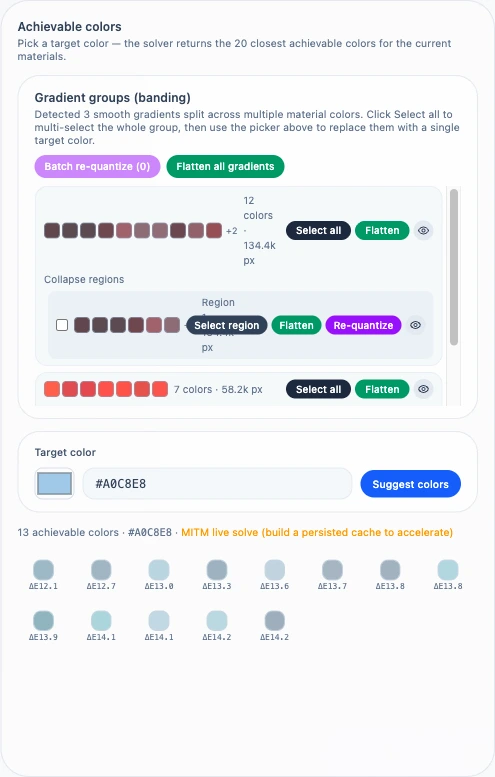
Enter a target
Use the system colour picker or type a three- or six-digit HEX value such as #8CE or #88CCEE. Press Enter or select
Suggest colours. Three-digit input is expanded to six digits and letters are normalised to uppercase. Invalid HEX
input cannot be submitted.
The solver returns up to 20 candidates ordered by ΔE00 from the target. It also keeps a minimum distance between candidates so the list is not filled with near-duplicates; fewer than 20 results can therefore be valid.
Each swatch shows its predicted colour and ΔE. Hover to inspect the full HEX, ΔE, and recipe indices. ΔE compares the model prediction with the requested colour; it is not a guarantee of physical print error. Filament batch, layer height, build surface, and viewing light still affect the print.
Query source
The result line identifies the path used for this query:
- Cache hit: an exhaustive cache matches the active materials, layers, height, substrate, and grid density.
- Runtime hit: the saved 32-million-candidate smart recipe cache is available.
- MITM live solve: neither reusable source exists, so the request searches at most two million combinations.
Live solving keeps ordinary queries interactive. A large material/layer combination can exceed that bound; build an exhaustive cache or the 32M smart recipe cache first. Caching changes query coverage and speed, not the underlying material profiles.
Apply a suggestion
When a valid source selection already exists, generating suggestions stages the first candidate automatically. Select another swatch to stage that colour instead. The 2D and 3D previews are rebuilt only after Confirm replacement; Cancel discards the pending choice.
The active Workstation selection mode defines the replacement scope:
- All replaces every pixel using the selected source colours.
- Current and Region affect one connected region.
- Multi applies one operation to all selected regions.
Related pages:
Submit feedback
Your feedback is sent privately to the Wiki maintainers and is not displayed publicly on this page.