This article was prepared with AI assistance based on an analysis of the current Lumina Studio source code, existing Wiki content, and relevant workflows. It has been checked against the current version, but omissions or details that become outdated may remain as the software evolves. If you find an error or have a clearer explanation, example, or suggestion, please leave a comment on this page or propose an edit on GitHub.
Report a Bug and Diagnostic Context
Report a bug creates a reproducible support ticket for the Lumina developer. It keeps the user's description and current application context together, reducing follow-up questions about mode, LUT, and recent actions.
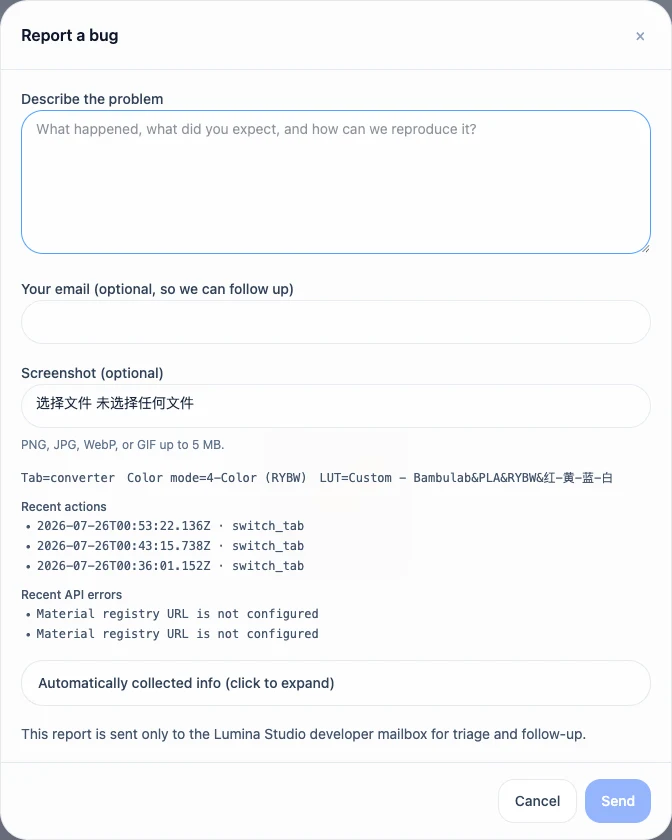
What to provide
- Description: required, up to 10,000 characters;
- Contact email: optional, up to 320 characters;
- Screenshot: optional PNG, JPEG, WebP, or GIF, no larger than 5 MB.
Describe the expected result, actual result, and exact steps that repeat the issue. When a problem depends on a particular image, LUT, material archive, or 3MF, do not assume that the source file is safe to publish. Describe the symptom first and provide the smallest authorised sample when needed.
Automatic context
The dialog collects one context snapshot when it opens. Its compact summary displays:
- active page;
- active colour mode;
- current LUT;
- the three most recent actions;
- the two most recent API errors.
Full context is serialised only after the user expands its disclosure. Typing in the description does not repeatedly recollect the application, so reproduce the issue first and then open the form.
Paths and technical errors
The manual fallback text replaces common local paths, file:// locations, Windows or UNC paths,
and stack frames. A bare HTTP status error is converted to a readable message. These safeguards
reduce accidental leakage but do not replace review:
- text entered in Description is user-authored and is not rewritten;
- an attached screenshot can contain filenames, accounts, notifications, or private information;
- customer artwork, unreleased designs, and unauthorised source files should not be uploaded.
Inspect the expanded context and screenshot before sending. Redact the source image itself when necessary rather than relying on deletion after submission.
Submission result and fallback delivery
A successful submission returns a ticket identifier and reports whether email was sent, is pending, failed, or is not configured. If email failed or is unavailable, a relay is attempted only when the environment offers it and the user explicitly chooses to send.
If automatic submission fails, Lumina prepares a copyable fallback report and provides system-mail and QQ Mail routes. Review the generated text before sending and keep the ticket identifier with any follow-up message.
Submit feedback
Your feedback is sent privately to the Wiki maintainers and is not displayed publicly on this page.